

If your Laravel application has one or more public-facing pages that never change between requests – e.g. a landing page, or a teaser like PixelWatcher at the moment – there is no reason for them to reach your server on every visit. Serving those pages from a CDN edge cache instead is a small change with a meaningful impact on both performance and cost.
This post covers the full setup: from a dedicated middleware group in Laravel to the Cloudflare cache rules that wire it all together.
The problem
Out of the box, Laravel adds session and cookie handling to every response. Even for a page that doesn't use a session, the framework will set headers like Set-Cookie and Cache-Control: no-cache, private. CDNs typically treat these as signals not to cache the response, so every request hits your server.
The fix is to handle static and dynamic pages separately.
Static routes
First, create a dedicated route file for static pages (e.g. routes/static.php):
<?php

use Illuminate\Support\Facades\Route;

Route::get('/', fn () => view('welcome'))->name('home');
Here, it contains a single route, pointing to the default "welcome" page.
Middleware
Then, create a dedicated middleware:
<?php

namespace App\Http\Middleware;

use Closure;
use Illuminate\Http\Request;
use Symfony\Component\HttpFoundation\Response;

final class SetStaticCacheHeaders
{
    public function handle(Request $request, Closure $next): Response
    {
        $response = $next($request);

        $response->headers->set(
            'Cache-Control',
            'public, max-age=0, s-maxage=3600, stale-while-revalidate=60',
        );

        $response->headers->remove('Set-Cookie');

        return $response;
    }
}
This produces the following Cache-Control header:
Cache-Control: public, max-age=0, s-maxage=3600, stale-while-revalidate=60
max-age=0 tells browsers not to serve a stale copy without revalidating — so users always get a fresh response.
s-maxage=3600 tells shared caches (like Cloudflare's edge) to cache the response for one hour.
stale-while-revalidate=60 allows the CDN to serve a stale response while it fetches a fresh one in the background, keeping latency low.
The middleware also ensures that no Set-Cookie header is present, so that the response won't contain a cookie that would otherwise prevent caching.
Route declaration and middleware group
Finally, declare our route file in bootstrap/app.php, as well as a custom static middleware group:
return Application::configure(basePath: dirname(__DIR__))
    ->withRouting(
        web: __DIR__.'/../routes/web.php',
        commands: __DIR__.'/../routes/console.php',
        health: '/up',
        then: function (): void {
            Route::middleware('static')->group(base_path('routes/static.php'));
        },
    )
    ->withMiddleware(function (Middleware $middleware): void {
        $middleware->group('static', [SetStaticCacheHeaders::class]);
    })
The static middleware group only has the SetStaticCacheHeaders, deliberately omitting all session and cookie middlewares (as opposed to the web middleware group, which is applied to all routes in web.php by default).
Cloudflare cache rules
On its own, the middleware isn't enough – Cloudflare needs to be told when to cache and when to bypass, which is handled through Cloudflare’s Cache Rules.
Here, the order matters: the bypass rules must come before the caching rule.
Note The below is covered by Cloudflare’s free plan.
Rule 1: Bypass stateful routes
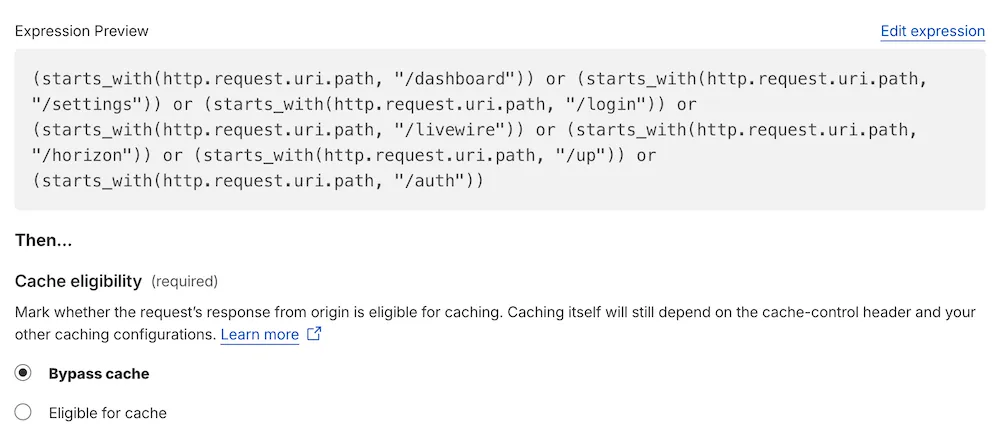
Some routes must never be cached, like anything involving authentication, Livewire AJAX calls, or internal framework endpoints.
Here is an example filter expression:
(starts_with(http.request.uri.path, "/dashboard") or
 starts_with(http.request.uri.path, "/login") or
 starts_with(http.request.uri.path, "/auth") or
 starts_with(http.request.uri.path, "/livewire") or
 http.request.uri.path eq "/up")
For this rule, select Bypass cache under Cache eligibility:
Rule 2: Bypass when session cookies are present
Once a user is logged in, their requests carry laravel_session and XSRF-TOKEN cookies. You don't want to serve them a cached page that was built for an anonymous visitor.
Expression:
(http.cookie contains "laravel_session" or
 http.cookie contains "XSRF-TOKEN")
Also select Bypass cache for this rule.
Rule 3: Cache the static page
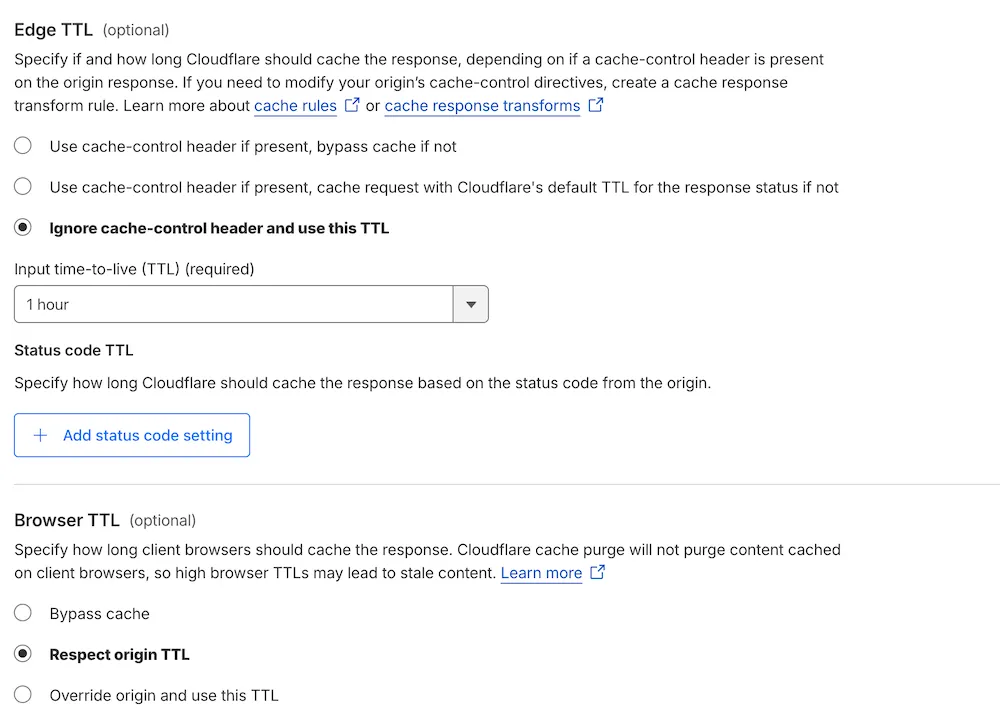
Finally, the actual caching rule, targeting the home page:
http.request.uri.path eq "/"
For this one, select Eligible for cache, a custom 1-hour TTL for Edge TTL, and Respect origin TTL under Browser TTL:
Verifying it works
Load your page and inspect the response headers. On the first request you should see:
CF-Cache-Status: MISS
Cache-Control: public, max-age=0, s-maxage=3600, stale-while-revalidate=60
On subsequent requests:
CF-Cache-Status: HIT
No Set-Cookie header should appear.
For dynamic pages, the opposite should be true – CF-Cache-Status: DYNAMIC and Cache-Control: no-cache, private, confirming that Cloudflare is bypassing the cache entirely.
Resources
- Laravel’s Routing documentation
- Laravel’s Middleware documentation
- Cloudflare Cache Rules documentation